16. Aircraft availability overview
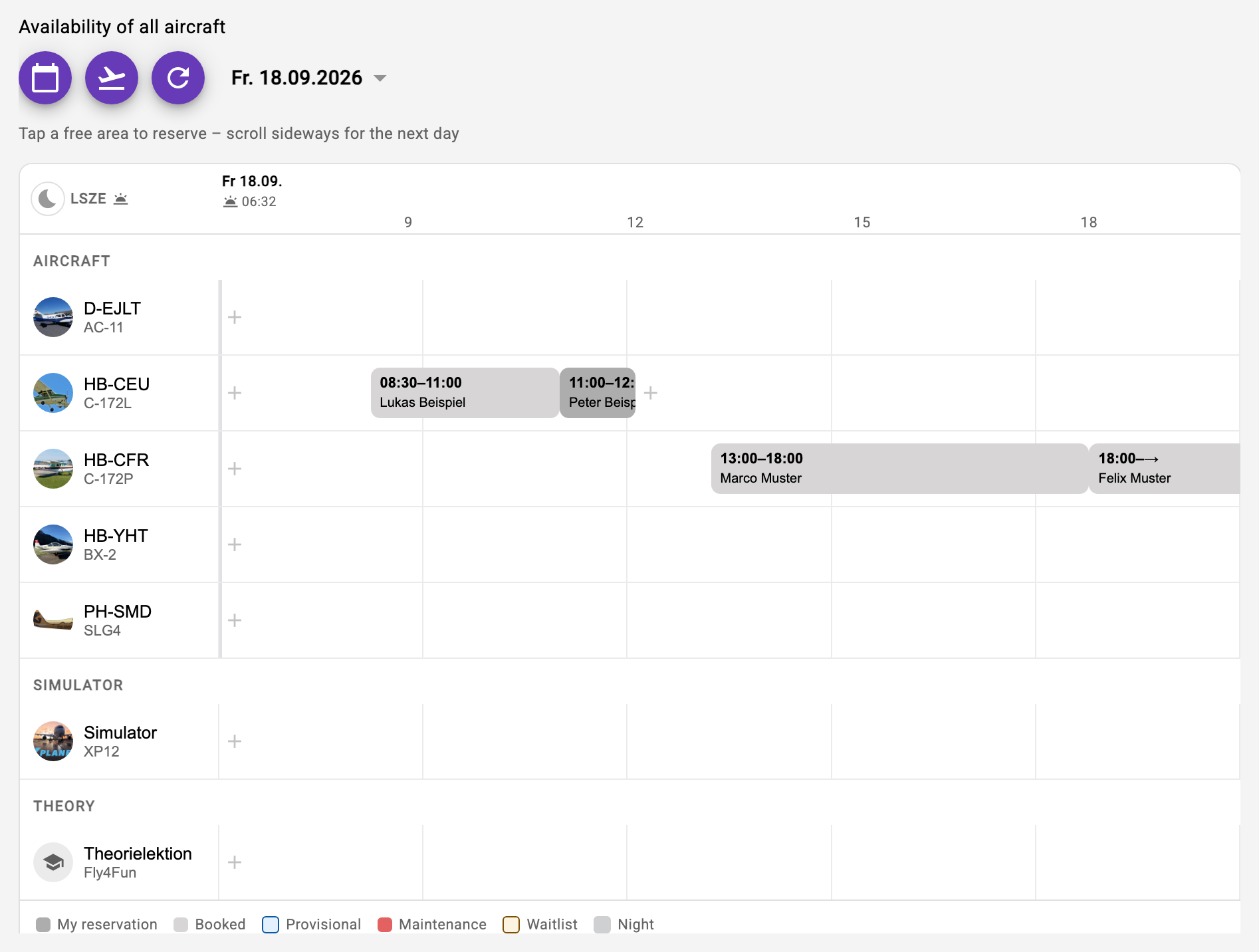
When you open the reservations, the availability overview appears at the top: all aircraft of your clubs on one shared time axis. The axis is a continuous band - if you scroll sideways past the edge, the next or previous day is loaded and appended. So you can simply keep scrolling instead of hitting a wall. The arrows still jump one day at a time, the date picker to any date; the red line marks the current time.
Because the band carries several days, a multi-day reservation appears as one continuous bar instead of being cut off at every day.
- Tap a free area: the reservation form opens prefilled with aircraft, date and the start time you tapped - from there all the usual rules apply (check flights, instructor, waitlist).
- Tap an occupied bar: a summary of the reservation opens; those allowed to can edit it directly from there, and for a future reservation of another member the "Join waitlist" button puts you on the waitlist (see 12).
- Tap the registration: opens the familiar single agenda of that aircraft - the previous route via the aircraft selection further down is unchanged.
16.1 Daylight and night
By default the axis shows the bright part of the day, computed from civil twilight at the home base of each aircraft. That way it matches the season: in Bad Ragaz daylight runs from 04:46 to 22:00 on 21 June, but only from 07:29 to 17:10 on 21 December.
The times appear as small sun symbols in the header, and the night is drawn as a darker area - so you can see at a glance how long the day is on that date. The moon symbol in the header expands the axis to the full day, 00 to 24 hours; your device remembers the choice.
The twilight times are computed. The table in the VFR Manual remains authoritative.
If the aircraft are based at different home bases, the rows are grouped by base and each group carries the times of its own airfield. If they all share one base - the normal case - there is no grouping. Simulators and theory lessons get no daylight display; it does not apply to them.
Night reservations are possible. The display is only a section, not a rule: the time fields of the reservation form cover the whole day, regardless of what is currently visible.
16.2 Colours
The colour of a bar says what is flown: teal is a flight, blue a training session (with an instructor, including theory and the simulator with an instructor), orange a passenger flight from a flight assignment (sightseeing or trial flight). Red hatching is maintenance, the aircraft is blocked. Training and passenger flights also carry a small symbol in front of the name.
The fill says whose reservation it is: yours are solid, everyone else's are in the light shade with a coloured edge on the left. A reservation is yours if you fly it or are entered as its instructor - even if someone else created it. A dashed, hatched reservation is provisional: the request to the instructor is still open. What is already over appears paler so that what is coming stands out.
Every second row is lightly tinted so you stay in the row while scrolling sideways. The number on a bar shows waitlist entries, and a route symbol marks a reservation with a timetable (see chapter 21). On narrow devices the registration column stays put and only the time axis can be swiped sideways. The cards in an aircraft's agenda carry the same colours; yours are framed there.